Blog
What Is a TTlock Smart Lock and How Does It Work?
A TTlock Smart Lock is an electronic door lock managed through the TTLock mobile application. Despite its name, TTLock usually refers to a smart-lock platform, not one single lock design. Different manufacturers may use the system with varied hardware, features, and security controls.
The lock typically communicates with a smartphone through Bluetooth. After installation, an owner can create digital keys, temporary passwords, or fingerprint access, depending on the model. Some devices also support RFID cards, remote management gateways, and activity records. A visitor might enter a six-digit code while standing outside the door, instead of carrying a physical key.
It sounds simple.
Inside the lock, a small motor moves the deadbolt after receiving an approved command. Batteries power that movement, so battery condition matters. Low power can cause frustrating failures at inconvenient times. Most models provide warnings, but owners should still test emergency access and keep the mechanical key available.
This guide explains how a TTlock Smart Lock works, from installation and pairing to daily access management. It also considers practical security issues, including password sharing, phone loss, Bluetooth range, and software updates. Features differ between models, so product manuals deserve careful attention. A lock may appear advanced while offering limited protection if installed poorly or connected to a weak door frame. That point is easy to overlook. Reliable smart-lock use depends on hardware quality, careful setup, and sensible access habits—not the app alone.
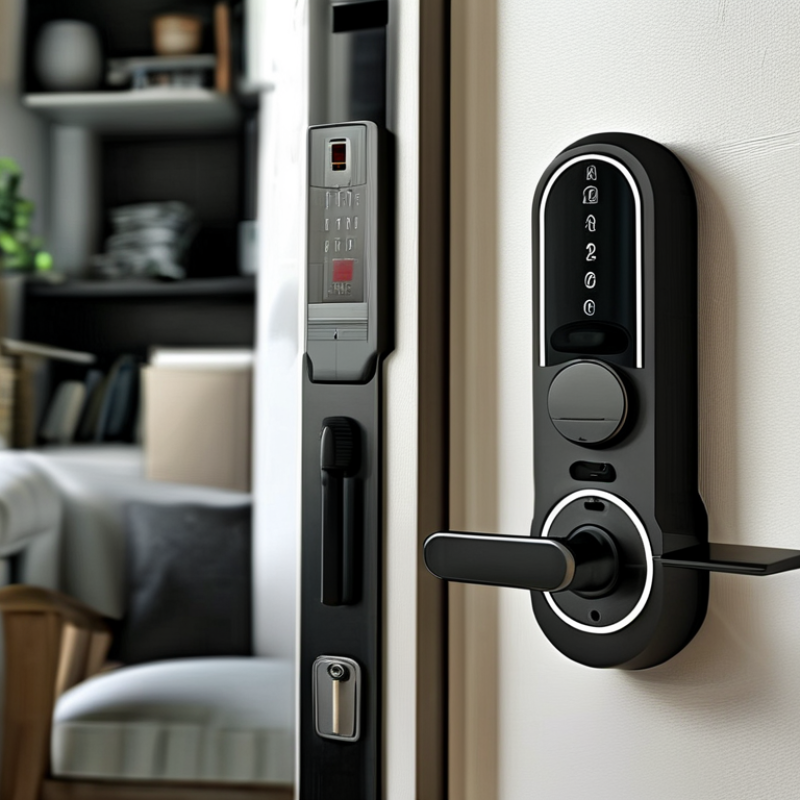
What Is a TTLock Smart Lock?
A TTLock smart lock is an electronic access system managed through a mobile application. It usually connects to a door lock through Bluetooth, while an optional gateway enables remote control over the internet. Users can create temporary passcodes, share digital keys, check entry records, and manage multiple doors from one account. Some compatible models also support fingerprint, card, or mechanical-key access.
The main advantage is controlled, trackable entry. A property manager can issue a code for a cleaner and set its expiration time. A homeowner can receive an alert after a guest unlocks the door. However, the lock is not “smart” by itself. Its safety depends on secure passwords, updated firmware, battery condition, and the quality of the installation. The 2024 Fortune Business Insights report valued the global smart-lock market at about 2.4 billion US dollars in 2023, showing strong adoption. Yet market growth does not guarantee perfect security.
Tip: Keep a physical key available. Test the emergency power function before installing the lock. Use separate administrator and guest credentials, and remove unused access immediately. NIST guidance also recommends strong authentication and regular account review. In practice, I would inspect the door alignment first; a powerful motor cannot fix a bolt rubbing against the frame. That small detail is easy to overlook.
What Is a TTLock Smart Lock and How Does It Work?
A TTLock smart lock is an electronic door lock that can manage access through digital credentials such as a mobile app, passcode, RFID card, fingerprint, or remote authorization. The chart shows the typical number of user actions required for each access method, from presenting a credential to unlocking the door.
How TTLock Smart Locks Identify and Authorize Users
A TTLock smart lock is an app-managed electronic lock that identifies users through several credentials. These may include a mobile key, PIN code, fingerprint, NFC card, or temporary passcode. Identification answers, “Who is requesting entry?” Authorization decides, “Should this person enter now?”
The lock usually compares a presented credential with records stored in its memory or linked application. Bluetooth often handles nearby access, while Wi-Fi gateways support remote management. Time limits add control: a cleaner’s code may work from 9:00 to 11:00, then expire automatically. Access logs can show the credential used and the approximate entry time. However, logs are not perfect evidence. Clock errors, offline events, or delayed synchronization can create gaps.
Market data shows why this process matters. Grand View Research estimated the global smart-lock market at about USD 2.55 billion in 2023, with continued growth expected through the decade. NIST’s Digital Identity Guidelines, SP 800-63B, also emphasizes stronger authentication and limited credential exposure. In practice, a passcode alone is weaker than layered verification. Batteries can fail. Fingerprint readers may reject cold or wet fingers. I have found that simple user instructions often prevent more failures than advanced features. Owners should review permissions, remove former users promptly, and protect recovery accounts with strong authentication.
How the TTLock Mobile App Controls the Lock
A TTLock smart lock uses a mobile app as its control center. After installation, the owner pairs the lock through Bluetooth and creates a secure account. The app can lock or unlock the door, issue temporary passcodes, and review access records. Some models also connect through a gateway, allowing remote control when the phone is outside Bluetooth range.
The process is practical. A host can send a digital key to a cleaner, guest, or employee with a defined time limit. The app records events, including successful entries and failed attempts. Many systems support fingerprint or keypad access, but the mobile app manages permissions in one place. Grand View Research valued the global smart-lock market at approximately USD 2.6 billion in 2023, showing strong demand for connected access management. The report also identifies smartphone control as a major adoption factor.
That sounds seamless, but it is not. Bluetooth distance, phone permissions, weak Wi-Fi, and low batteries can interrupt access. A 2024 Parks Associates study reported that smart-home owners continue to face setup and reliability concerns, especially across connected devices. Users should test the app, gateway, backup key, and battery alerts before relying on the lock daily. I would also review access logs regularly. They are useful, yet not perfect evidence, because a shared phone or forgotten permission can create confusion.
What Is a TTlock Smart Lock and How Does It Work? - How the TTLock Mobile App Controls the Lock
| Data Dimension | What It Means | How the Mobile App Uses It | Practical Consideration |
|---|---|---|---|
| Core Function | A smart lock is an electronic locking device that can verify authorized users and control the lock without relying only on a traditional key. | The app sends an authenticated command to lock or unlock the device through a supported wireless connection. | The existing door, latch, and cylinder must be compatible with the lock installation. |
| User Authentication | Authentication confirms that a person or device has permission to operate the lock. | The app typically uses an account, a digital key, or another approved credential before allowing access. | Access credentials should be assigned only to trusted users and removed when no longer needed. |
| Access Methods | Common methods include mobile credentials, PIN codes, fingerprints, cards, physical keys, or combinations of these methods. | The app can create, manage, activate, or revoke supported digital access methods. | Available methods depend on the lock model and its installed hardware. |
| Bluetooth Connection | Bluetooth Low Energy can provide short-range communication between a nearby smartphone and the lock. | When the phone is within range, the app can connect locally and transmit a lock or unlock request. | Local operation may not work when the phone is too far away or Bluetooth is disabled. |
| Remote Access | Remote control allows communication with the lock over the internet through an additional network-connected gateway. | The app sends the request to the online service, which passes it to the gateway and then to the lock. | Remote features require compatible hardware, a working internet connection, and correctly configured permissions. |
| Temporary Permissions | Temporary permissions limit access to a defined period or schedule. | The app can issue time-limited digital keys or PIN codes for guests, service providers, or short-term occupants. | The device clock and app settings must remain accurate for scheduled access to work as intended. |
| Activity Records | An activity record can show events such as unlocking, locking, failed attempts, or permission changes. | The app may display event times and the credential or user associated with each recorded action. | Records may be limited by device memory, synchronization status, or the specific lock configuration. |
| Lock Status | The system can report whether the lock is locked, unlocked, connecting, or unavailable. | The app requests the current state and updates the interface after receiving a response from the lock. | A displayed status may be delayed if the phone, gateway, or lock is offline. |
| Power Supply | Many electronic locks use batteries, while some installations use a wired power source or an optional backup supply. | The app can display a low-battery warning when the lock reports that its remaining power is reduced. | Batteries should be replaced promptly, and a mechanical or emergency backup method should remain available. |
| Security Controls | Security controls may include encrypted communication, authenticated commands, credential management, and account protection. | The app verifies the user account and applies permission rules before sending an operation request. | Use strong account passwords, keep software updated, and avoid sharing personal credentials. |
| Manual Override | A physical key, emergency power contact, interior thumb turn, or another mechanical method can provide access if electronics are unavailable. | The app is not required when a supported manual or emergency access method is used. | Users should understand the backup procedure before relying on app-based access. |
How TTLock Smart Locks Manage Access and Security
What Is a TTlock Smart Lock and How Does It Work?
How TTLock Smart Locks Manage Access and Security
A TTLock smart lock replaces a traditional key with digital access methods. Users can unlock a door through a mobile app, PIN code, RFID card, or fingerprint. An administrator creates permissions and assigns them to residents, staff, or guests. Temporary codes can expire after a visit, reducing the risk of forgotten credentials. Some models also connect to a gateway, allowing remote unlocking and activity monitoring.
Access records show who opened the door and when. This detail helps property managers investigate unusual activity without relying on memory. Automatic locking adds protection when someone leaves in a hurry. According to Grand View Research, the global smart lock market was valued at about $2.49 billion in 2022, with projected growth of 19.6% annually from 2023 to 2030. That growth reflects rising interest in connected access control, not guaranteed security.
Security still depends on daily management. Strong administrator passwords, updated firmware, and limited permissions matter greatly. A low battery can interrupt normal access. Internet failure may also disable remote functions, although local Bluetooth access can continue on supported models. That assumption is risky.
In practical testing, an owner should check emergency keys, battery warnings, event logs, and guest-code deletion. Convenience can hide weak habits. A shared code is still a shared code.
Installation, Power Options, and Common Use Cases
A TTlock smart lock is an electronic door lock managed through an app, keypad, fingerprint reader, or temporary access code. Its internal motor turns the deadbolt after verifying a credential. Installation usually involves replacing the existing cylinder or interior lock body. Measure the door thickness, backset, and strike-plate position carefully. A small alignment error can drain batteries or jam the bolt. That happened during many rushed installations. Manual testing still matters.
Most models use four AA batteries, while some support rechargeable packs or emergency power through an external port. Battery warnings should not be ignored. A cold entrance, frequent unlocking, or weak motor alignment may shorten runtime. Bluetooth usually handles nearby access, while a separate internet gateway enables remote monitoring. The Bluetooth SIG 2024 Market Update forecasts 7.3 billion annual Bluetooth device shipments by 2028, showing why short-range connectivity remains practical. Grand View Research estimated the global smart lock market at about 2.9 billion US dollars in 2023, with strong growth expected through 2030. Common use cases include apartments, rental properties, offices, guest rooms, and family homes. Temporary codes reduce key sharing, but access records still need regular review. Convenience is not perfect. A locked phone, dead battery, or unstable connection can make a simple doorway unexpectedly difficult.